
Hair loss tracker for women, on iPhone
Is your part getting wider?
See it month by month.
Thinning hair, shedding after a baby, or minoxidil and waiting: the same photo of your part, hairline and temples every month, and month 0 next to today.
 Track one thing free
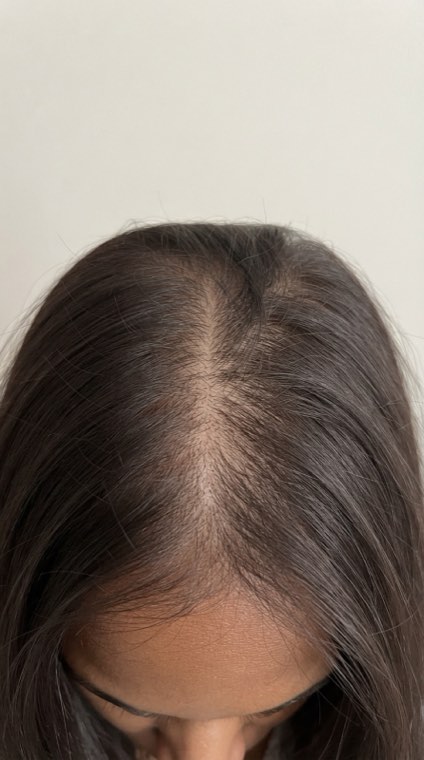 Month 0
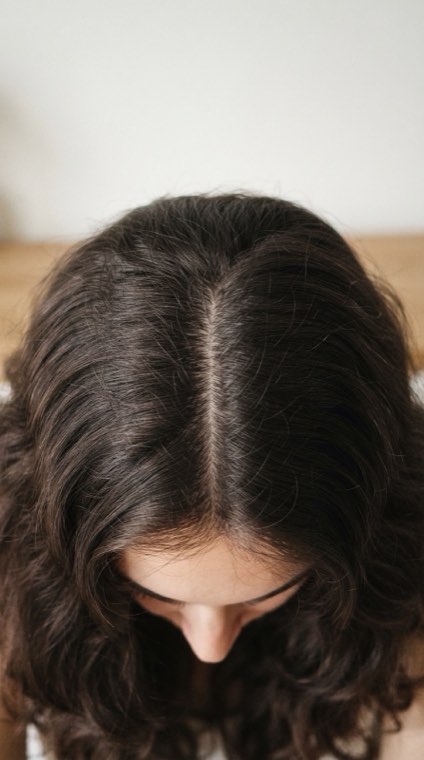 Month 8
- Month 8
5 photos of her part in 8 months on minoxidil. Tap a month to set it beside Month 8. An example, not a customer.
Your part, hairline and temples,
every month.
The hair tracker takes the views thinning hair shows up in and counts the months of a treatment, so every photo says how far in you were.
Part, hairline, temples.
One step at a time, like setting up Face ID: chin down for the hairline, each temple, then the phone over your head for the part and crown.
It counts the months.
On minoxidil or another medication every photo is filed under its month. For PRP or microneedling it counts sessions, after a transplant the months since.
Light like last time.
Before it shoots, it says when the light is darker, brighter or from the other side than last time. Overhead light makes any part look wider.
Lined up by your face.
Compare any two dates: hairline and temple photos are lined up by your eyes, nose and mouth, so you see the hair, not where the phone was.
Thinning, or just the light?
Photos tell you.
Hair loss in women rarely looks like a receding hairline. The part widens a little, the ponytail feels thinner, more scalp shows under the bathroom light, and you find more hair in the brush. It happens so slowly that you can't tell from the mirror whether it is getting worse, staying the same or growing back.
Hair progress photos settle it. Take your part from above, your hairline and both temples once a month, in the same spot and the same light, with your hair dry and parted the same way, and set month 0 beside today. A narrower part, less scalp at the crown, fine new hairs along the hairline: the change shows up in a hair before and after.
It works for minoxidil and other medication, where regrowth usually shows after 3 to 6 months, for PRP and microneedling counted by session, and for shedding after pregnancy or stress, which you can simply watch month by month. Glow Up files every photo under its month, so your hair regrowth timeline builds itself.
Read more: How long does minoxidil take to work? · How to take progress photos you can actually compare
Your part on any two dates,
side by side.
A thinning hair before and after in one place: drag across, or set them side by side. Pinch one and the other zooms to the same spot on your part.
Drag to compare. Example photos.
Thinning hair questions,
answered.
How do I know if my part is getting wider?
Photograph your part from above with your hair dry and parted the same way every month, and compare month 0 with today. Glow Up keeps that photo with your hairline and temples in one set.
How long does minoxidil take to work for women?
Regrowth usually shows after 3 to 6 months, and it differs from person to person. Monthly minoxidil progress photos show the small changes on the way, so you don't stop in month two.
Can I track hair shedding after pregnancy?
Yes. Choose Just watching and take the same photos every month. Comparing month 0 with today shows whether the hair is coming back, instead of counting hairs in the brush.
How do I know if my hair loss treatment is working?
Choose Medication, or PRP or microneedling, and the app counts the months or sessions. Compare the first set with today, side by side, and share it with your dermatologist if you like.
How do I take good hair progress photos?
Same spot, same time of day, dry hair parted the same way, light in front of you. Glow Up shoots the hairline, both temples and the crown in turn and says when the light is unlike last time.
Can I make a hair before and after picture?
Yes. Pick any two dates, compare them with the slider or side by side, and share them as one picture with the date under each photo.
Are my photos private?
They stay on your iPhone. No account, no ads, and never a photo on our servers. You can lock the tracker with Face ID.
Is it free?
Tracking one thing is free and complete: every photo, comparisons, reminders, the lock and export. Pro tracks several things at once and makes timelapses.
Take the first one
today.
In a few weeks it will be the photo you compare everything with.
Track one thing free